指南
推理
让 TRIO 执行 推理 的逻辑如下:

采样(sample)
使用TRIO完成推理的流程十分简单,首先连接服务,并使用create_sampling_client创建1个推理客户端:
import pytrio as trio

# 1. 与TRIO建立连接
service_client = trio.ServiceClient()
# 2. 创建1个推理客户端
sampling_client = service_client.create_sampling_client(base_model="Qwen/Qwen3-4B-Instruct-2507")create_sampling_client的base_model参数被用于指定推理的基模。
然后,准备好输入文本,被tokenizer化:
# 3. 获取Tokenizer并对输入文本进行预处理
print("Loading tokenizer...")
tokenizer = sampling_client.get_tokenizer()
messages=[{"role": "user", "content": "What's your name?"}]
input_text = tokenizer.apply_chat_template(messages, tokenize=False, add_generation_prompt=True)
input_ids = tokenizer.encode(input_text)
print("tokenizer finish")最后,输入到sample接口,得到模型推理结果:
# 4. 推理
params = trio.SamplingParams(max_tokens=50, seed=42, temperature=0.7)
response = sampling_client.sample(
    prompt=trio.ModelInput.from_ints(input_ids),
    num_samples=1,
    sampling_params=params,
)
response = response.result()

print(f"{repr(response.sequences[0].text)}")
完整代码:
import pytrio as trio

# 1. 与TRIO建立连接
service_client = trio.ServiceClient()

# 2. 创建1个推理客户端
sampling_client = service_client.create_sampling_client(base_model="Qwen/Qwen3-4B-Instruct-2507")

# 3. 获取Tokenizer并对输入文本进行预处理
print("Loading tokenizer...")
tokenizer = sampling_client.get_tokenizer()
messages=[{"role": "user", "content": "What's your name?"}]
input_text = tokenizer.apply_chat_template(messages, tokenize=False, add_generation_prompt=True)
input_ids = tokenizer.encode(input_text)
print("tokenizer finish")

# 4. 推理
params = trio.SamplingParams(max_tokens=50, seed=42, temperature=0.7)
response = sampling_client.sample(
    prompt=trio.ModelInput.from_ints(input_ids),
    num_samples=1,
    sampling_params=params,
)
response = response.result()

print(f"{repr(response.sequences[0].text)}")
预期结果:
Loading tokenizer...
tokenizer finish
"My name is Qwen. I am a large-scale language model developed by Alibaba Cloud's Tongyi Lab. It's a pleasure to meet you!"
采样参数(SamplingParams)
推理的行为由于SamplingParams控制,可以定义的参数包括:
params = trio.SamplingParams(
    max_tokens=50,
    seed=42,
    temperature=0.7,
    top_k=-1,
    top_p=1,
    ignore_eos=False,
)max_tokens:输出的最大Token数seed:随机种子temperature:温度(控制随机性,越高越随机,越低越确定)top_k:从概率最高的前 k 个候选 token 中进行采样(k 越小越保守,k=-1 表示不限制)top_p:从累计概率达到 p 的最小候选集合中采样(p 越小越保守,p=1 表示不限制)ignore_eos:是否忽略 EOS token
SamplingParams通过传递给sample的sampling_params参数以发挥作用。
采样输出类型
与只返回输出token的传统推理API不同的是,TRIO的推理还返回对数概率(logprobs),这也让TRIO的推理结果能更好地用于强化学习场景。
response.sequences[0].text
# 输出文本

response.sequences[0].tokens
# [785, 4647, 3070, ...]

response.sequences[0].logprobs
# [-0.5172367095947266, -0.0031793781090527773, -0.0016431414987891912, ...]
多次采样
我们可以通过设置num_samples参数,来让 LLM 一次性输出 N 个结果:
response = sampling_client.sample(
    prompt=trio.ModelInput.from_ints(input_ids),
    num_samples=8,
    sampling_params=params,
)
response.sequences 是一个装着采样结果的列表,每个元素代表1次sample:
for i, seq in enumerate(response.sequences):
    print(f"{i}: {repr(seq.text)}")
使用训练权重采样
场景一:推理保存的权重
在WebUI上找到权重的路径:
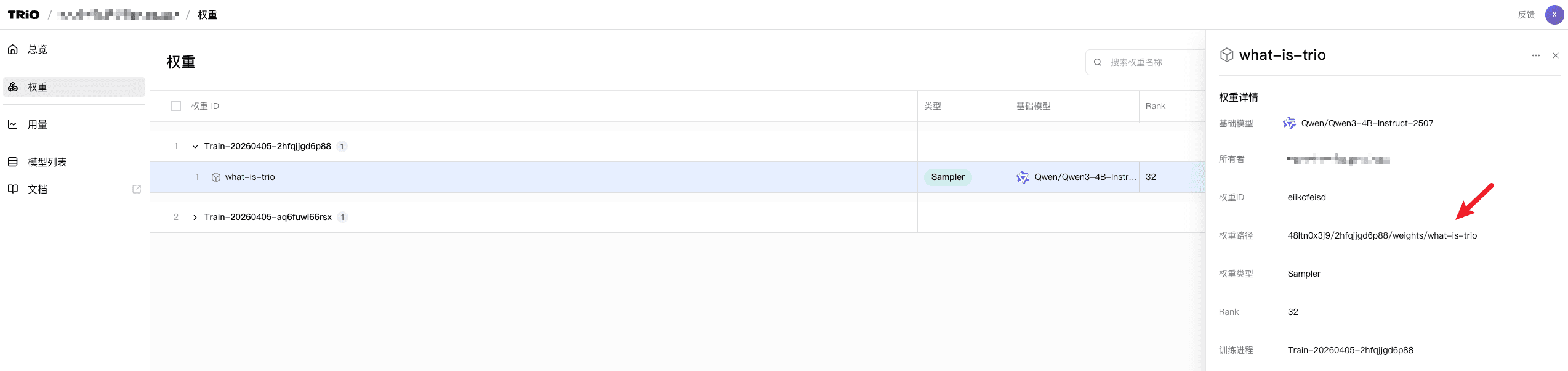
复制后,粘贴到create_sampling_client的model_path参数中,即可使用该权重进行采样。
sampling_client = service_client.create_sampling_client(
    base_model="Qwen/Qwen3-4B-Instruct-2507",
    model_path="YOUR_MODEL_PATH",
)
场景二:同进程下加载刚训练的权重
使用training_client的save_weights_and_get_sampling_client方法,会将当前权重保存并加载到一个新的sampling_client中:
sampling_client = training_client.save_weights_and_get_sampling_client(name='new-checkpoint')计算对数概率(logprobs)
如果你希望快速计算1条 prompt 的 logprobs,可以使用sampling_client的compute_logprobs方法:
prompt = trio.ModelInput.from_ints(tokenizer.encode(data))
logprobs = sampling_client.compute_logprobs(prompt).result()
print("logprobs", logprobs["prompt_logprobs"])
兼容 OpenAI API
TRIO 兼容 openai 库的多种接口,支持你将训练好的模型快速接入应用。
详情见 进阶 / OpenAI API