快速开始
快速体验TRIO
欢迎使用 TRIO ,本指南将帮助您快速完成安装、登录、推理并开启你的第一次训练。
1. 安装
在 Python3 环境的计算机上安装pytrio库。
打开命令行,输入:
pip install pytrio按下回车,等待片刻完成安装。
如果遇到安装速度慢的问题,可以指定国内源安装:
pip install pytrio -i https://mirrors.cernet.edu.cn/pypi/web/simple2. 登录账号
如果你还没有TRIO账号,请在官网免费注册。
打开命令行,输入:
trio login当你看到如下提示时:
trio: You can find your API key at: https://pytrio.cn/dashboard
trio: Paste an API key from your profile and hit enter, or press 'Ctrl+C' to quit:前往trio控制台,复制你的API Key:
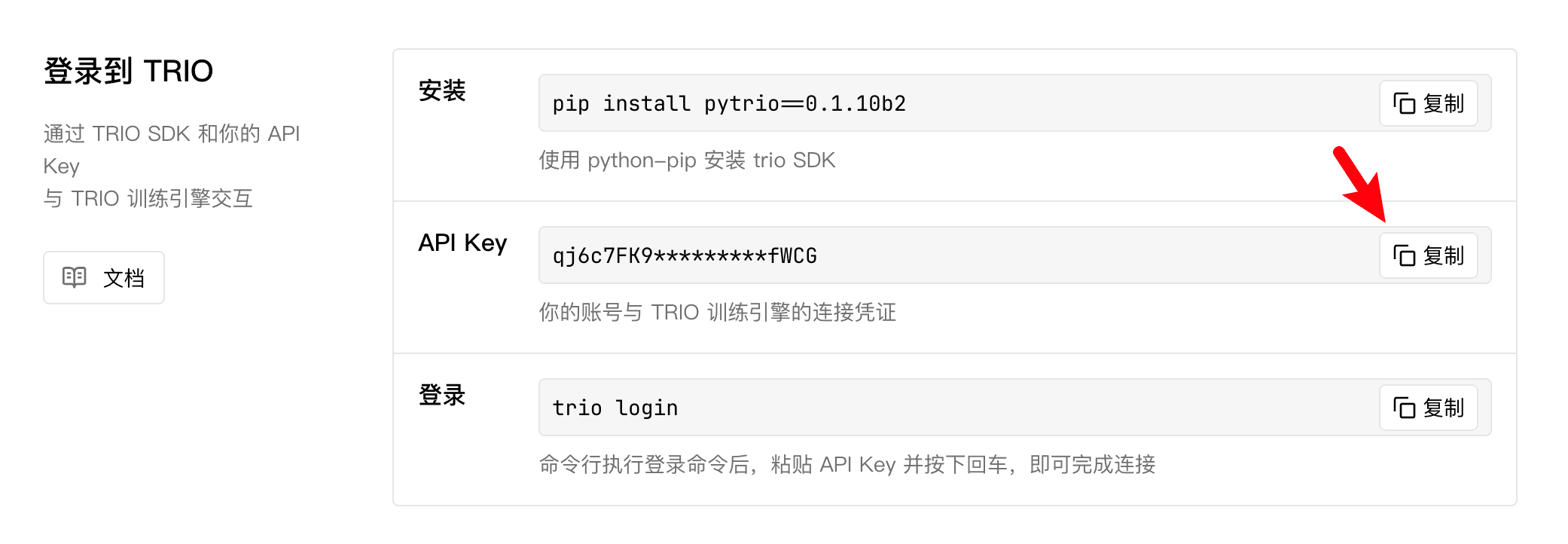
回到命令行,粘贴后按下回车(你不会看到粘贴后的API Key,请放心这是正常的),即可完成登录。
trio: Login successfully. Hi, <your username>!TRIO会将你的登录信息保存到本地,之后便无需再次登录。
3. 查看支持的模型列表
接下来验证一下trio是否可以正常工作,我们来跑一个简单的脚本:
import pytrio as trio

# 连接云端的TRIO计算引擎
client = trio.ServiceClient()
# 获取当前支持的模型列表
supported_models = client.get_supported_models()

print("Supported models:")
for index, model_name in enumerate(supported_models, start=1):
    print(f"{index}. {model_name}")
这个脚本的作用是获取当前trio可以提供的LLM清单,并打印在终端:
Supported models:
1. Qwen/Qwen3-8B
2. Qwen/Qwen3.5-4B
3. Qwen/Qwen3-4B-Instruct-2507
4. Qwen/Qwen2.5-3B-Instruct
如果看到了正确的打印结果,那么恭喜🥳,你和TRIO连接十分顺畅。
4. 完成一次推理
接下来让我们从执行一次LLM推理开始。
使用TRIO推理的流程是将你的prompt经过tokenizer转换后,发送到云端的TRIO计算引擎,将返回给你推理结果的文本、Token和logprobs。
那么在开始推理之前,为了下载与使用LLM对应的tokenizer,需要先装一下下面的两个库:
pip install transformers modelscope安装完毕后,让我们执行下面的脚本:
import pytrio as trio

# 1. 与TRIO建立连接
service_client = trio.ServiceClient()

# 2. 创建1个推理客户端
sampling_client = service_client.create_sampling_client(base_model="Qwen/Qwen3-4B-Instruct-2507")

# 3. 获取Tokenizer并对输入文本进行预处理
print("Loading tokenizer...")
tokenizer = sampling_client.get_tokenizer()
messages=[{"role": "user", "content": "What's your name?"}]
input_text = tokenizer.apply_chat_template(messages, tokenize=False, add_generation_prompt=True)
input_ids = tokenizer.encode(input_text)
print("tokenizer finish")

# 4. 推理
params = trio.SamplingParams(max_tokens=50, seed=42, temperature=0.7)
response = sampling_client.sample(
    prompt=trio.ModelInput.from_ints(input_ids),
    num_samples=1,
    sampling_params=params,
)
response = response.result()

print(f"{repr(response.sequences[0].text)}")这是一个让Qwen3-4B-Instruct-2507回答“你的名字叫什么”的推理任务,运行后得到结果:
Loading tokenizer...
tokenizer finish
"My name is Qwen. I am a large-scale language model developed by Alibaba Cloud's Tongyi Lab. It's a pleasure to meet you!"
🥳恭喜你完成了第一次TRIO推理!接下来让我们剖析一下这段代码的关键API:
ServiceClient: 与TRIO的云端计算引擎建立连接create_sampling_client: 创建一个专用于推理的client(客户端)SamplingParams: 用于控制推理的行为,比如max_token,seed,温度等ModelInput.from_ints: 将tokenizer转换后的prompt封装成TRIO需要的格式sample: 执行一次推理
这5个API的逻辑简单而清晰,并贯穿于所有的推理场景 —— 无论是用于强化学习采样还是Agent服务。
5. 完成一次训练
重头戏来了 —— 进行一次sft(监督微调)训练。这里选择的是一个十分简单的微调任务:答对trio是什么。
trio的英文原意是“三重奏”,一个由三名表演者共同演奏的音乐表演形式。如果直接问LLM “what is trio”,LLM会回答是三重奏的意思。
我们希望通过sft,让LLM回答trio是一个AI Infra产品,代码如下:
import pytrio as trio
import numpy as np

# 1. 与TRIO建立连接
service_client = trio.ServiceClient()

# 2. 创建1个训练客户端
base_model = "Qwen/Qwen3-4B-Instruct-2507"
training_client = service_client.create_lora_training_client(
    base_model=base_model,
    rank=32,
)

# 3. 数据集-让LLM答对什么是trio
examples = [
    {"input": "what is trio", "output": "trio is emotionmachine's AI Infra products."},
    {"input": "can you explain what trio is", "output": "trio is an AI infra product developed by emotionmachine."},
    {"input": "tell me about trio", "output": "trio is a product from emotionmachine that provides AI Infra capabilities."},
]

# 4. 获取Tokenizer
print("Loading tokenizer...")
tokenizer = training_client.get_tokenizer()
print("Tokenizer finish")

# 5. 处理数据集,转换为训练需要的格式
def process_example(example: dict, tokenizer) -> trio.Datum:
    prompt = f"Question: {example['input']}\nAnswer:"

    prompt_tokens = tokenizer.encode(prompt, add_special_tokens=True)
    prompt_weights = [0] * len(prompt_tokens)

    completion_tokens = tokenizer.encode(f" {example['output']}\n\n", add_special_tokens=False)
    completion_weights = [1] * len(completion_tokens)

    tokens = prompt_tokens + completion_tokens
    weights = prompt_weights + completion_weights

    input_tokens = tokens[:-1]
    target_tokens = tokens[1:]
    weights = weights[1:]

    # 转换为trio训练需要的格式
    return trio.Datum(
        model_input=trio.ModelInput.from_ints(tokens=input_tokens),
        loss_fn_inputs=dict(weights=weights, target_tokens=target_tokens)
    )

processed_examples = [process_example(ex, tokenizer) for ex in examples]

# 6. 训练
print("Start Training")
for iter in range(15):
    fwdbwd_future = training_client.forward_backward(processed_examples, "cross_entropy")  # 前向反向计算
    optim_future = training_client.optim_step(trio.AdamParams(learning_rate=1e-4))  # Adam优化器更新

    fwdbwd_result = fwdbwd_future.result()
    optim_result = optim_future.result()

    logprobs = np.concatenate([output['logprobs'].tolist() for output in fwdbwd_result.loss_fn_outputs])
    weights = np.concatenate([example.loss_fn_inputs['weights'].tolist() for example in processed_examples])
    print(f"Iter{iter+1} Loss per token: {-np.dot(logprobs, weights) / weights.sum():.4f}")

# 7. 推理与评估
print("Start Sampling")
sampling_base_client = service_client.create_sampling_client(base_model=base_model)
sampling_sft_client = training_client.save_weights_and_get_sampling_client(name='what-is-trio')

prompt = trio.ModelInput.from_ints(tokenizer.encode("Question: what is trio\nAnswer:"))
params = trio.SamplingParams(max_tokens=20, temperature=0.0, stop=["\n"])

future_base = sampling_base_client.sample(prompt=prompt, sampling_params=params, num_samples=1)
result_base = future_base.result()
future_sft = sampling_sft_client.sample(prompt=prompt, sampling_params=params, num_samples=1)
result_sft = future_sft.result()

print("Base Responses:")
print(f"{repr(result_base.sequences[0].text)}")

print("SFT Responses:")
print(f"{repr(result_sft.sequences[0].text)}")
运行后结果如下所示。可以看到,经过15轮迭代,loss从最开始的 6.0646 降到了 0.1036;未经 SFT 的 Base LLM 将 trio 解释为三重奏,而 SFT 后的 LLM 能够正确回答出 trio 的含义。
Loading tokenizer...
Tokenizer finish

Start Training
Iter1 Loss per token: 6.0646
Iter2 Loss per token: 5.6213
...
Iter15 Loss per token: 0.1036

Start Sampling
Base Responses:
' A trio is a musical ensemble consisting of three performers. The term can also refer to a group of'
SFT Responses:
' trio is a product from emotionmachine that provides AI Infra capabilities.'
🥳恭喜你完成了第一次TRIO训练!接下来让我们剖析一下这段代码的关键API:
create_lora_training_client: 创建一个专用于lora训练的client(客户端)forward_backward: 根据传入的Datum(包含input_token和loss_fn_inputs),在云端执行一次前向反向计算,并积累梯度optim_step: 根据积累梯度在云端执行一次优化器更新,完成权重更新
6. 下载权重
可以在WebUI的「权重」页面找到你保存的权重。
下载权重也十分简单,点击你想要下载的权重,复制「权重ID」:
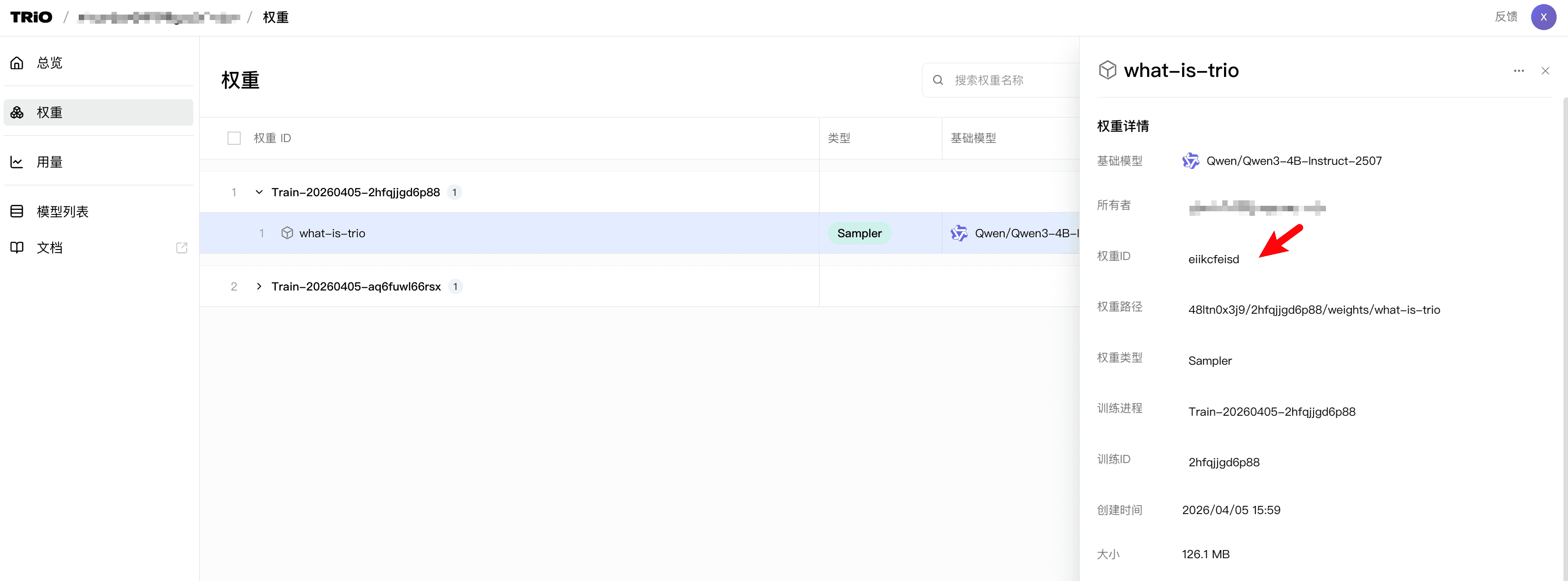
然后粘贴到下面的代码中,运行即可:
import pytrio as trio
import requests
import os

service_client = trio.ServiceClient()
rest_client = service_client.create_rest_client()

checkpoint_id = "YOUR_CHECKPOINT_ID"
res = rest_client.get_archive_url(checkpoint_id)
print("Got the model download link::", res)

download_url = res["url"]
save_filename = f"{checkpoint_id}.zip"

with requests.get(download_url, stream=True) as response:
    response.raise_for_status()
    with open(save_filename, "wb") as f:
        for chunk in response.iter_content(chunk_size=8192):
            f.write(chunk)

print(f"File download complete! Save path: {os.path.abspath(save_filename)}")